
Control groups
The control group mechanism helps evaluate the impact of communications on customer behavior within a segment by comparing metrics (purchase conversion, average receipt value, average revenue per customer) between customers who received the communication and those who did not.
This mechanism allows you to isolate a small subset—known as the control group—from the target communication segment. Typically, this represents 5–10% of the segment size. This control group does not receive the communication, yet the platform calculates the same metrics for them as it does for the main group that received the communication.
During post-analysis, the platform estimates what the revenue in the main group would have been if its metrics matched those of the control group (i.e., if the main segment had not received the communication).
Creating a control group
Control groups can be used in all types of mass messaging (email, SMS, push) and in campaigns.
In mass messaging
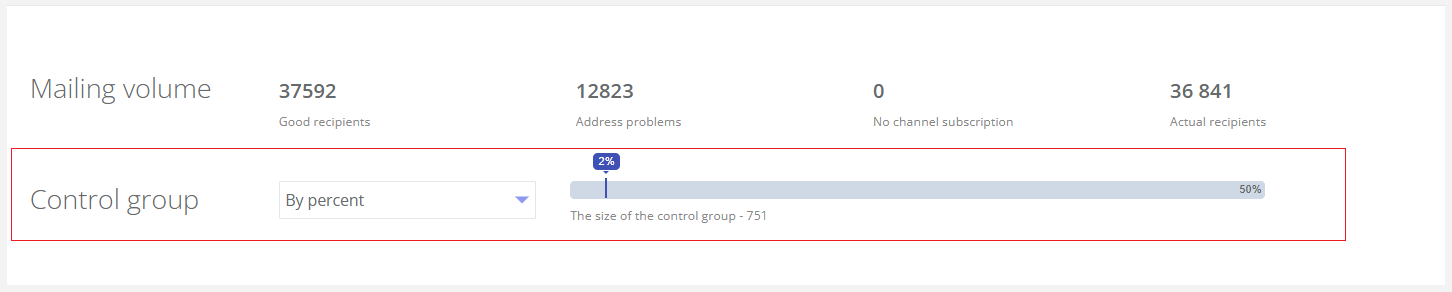
When creating a new mailing, after adding customers to the segment, the Messaging volume block appears. To create a control group, use the Control group size slider in the Messaging volume block.
|
You can define the control group size in two ways:
- By percentage — ranging from 0% to 50% of the target segment (default is 0%). The number of customers included in the control group is displayed.
- By target audience. When selecting this option, a list of created target audiences appears for selection as the control group.
In campaigns
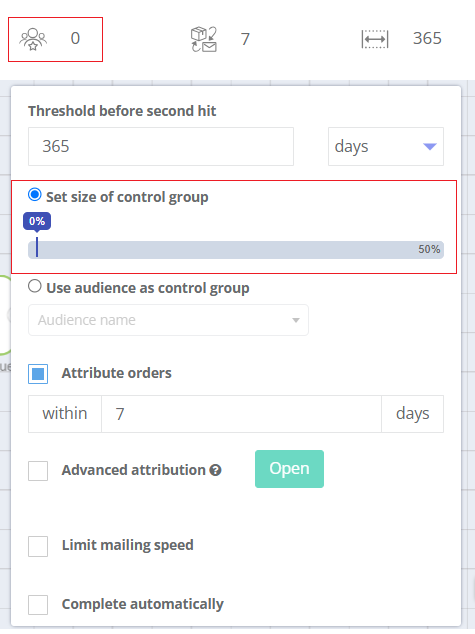
When creating a campaign, click the control group icon to set up a control group. In the pop-up window, specify the Control group size:
|
|
Stratification parameters
When configuring control groups within mass messaging and campaigns, you can specify stratification parameters. Stratification is a two-step process where the target audience is first divided into subgroups (strata) based on key characteristics or stratification parameters (e.g., age, gender, registration date, days since last receipt). Then, within each subgroup, customers are randomly assigned to the main and control groups. Stratification ensures that the control group is a representative replica of the main group across key parameters, enabling accurate measurement of communication impact.
Stratification parameters include attributes from the Customer filter group in the Segment builder.
or example, stratification can be performed using the following parameters:
- Current R-segment — number of days since the customer’s last purchase;
- Current F-segment — number of purchases made during the segmentation period;
- Current M-segment — total purchase amount during the segmentation period.
The system divides the target audience into the specified subgroups and randomly allocates customers within each subgroup to the main and control groups according to the percentage defined in the control group settings.
Control group reports
The control group report is available on the page containing all other mailing reports or campaign reports.
he table displays the following information for each group:
- Number of recipients — how many messages were sent to this group;
- Messages delivered — how many messages were successfully delivered to this group;
- Number of customers who made a purchase;
- Purchase conversion rate — the percentage of customers who made a purchase influenced by the mailing;
- Number of receipts in the group;
- Average number of receipts per customer;
- Total purchase amount;
- Average revenue per customer;
- Revenue forecast assuming control group conversion and average receipt value — estimated revenue if the mailing had not been sent:
- Calculated only for the main group.
- Equals (Messages delivered) × (Purchase conversion rate in control group) × (Average revenue per customer in control group).
For example, the report shows:
23,056 people received the mailing. Without the mailing, the purchase conversion would have been 1.09%, as observed in the control group. With this conversion rate, 23,056 × 0.0109 = 251 customers would have made a purchase. The average revenue per customer in the control group is RUB 9,435. Thus, without the mailing, total purchases would amount to 251 × 9,435 = RUB 2,368,185.
- Additional revenue — the incremental benefit generated by the mailing:
- Equals (Total purchase amount in main group) – (Revenue forecast assuming control group conversion and average receipt value).
For example, total purchases in the main group amount to RUB 3,453,671, while the forecasted revenue is RUB 2,379,208. The difference is RUB 1,074,463.
Control groups in the Segment builder
In the Segment builder, you can use filters related to control groups (CG):
- Participated in CG of email mass messaging;
- Participated in CG of SMS mass messaging;
- Participated in CG of push mass messaging;
- Participated in CG of campaign.
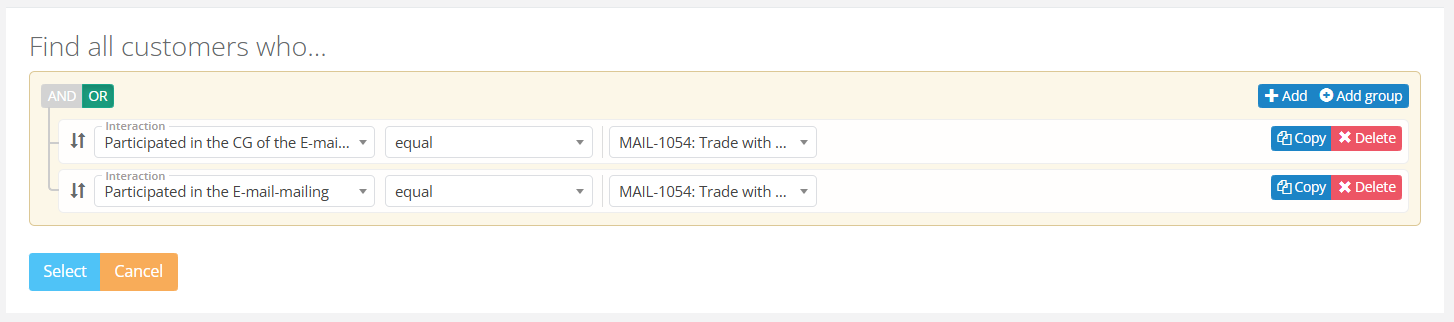
For mailings/campaigns with a control group, the filters Participated in email mailing, Participated in SMS mailing, Participated in push mailing, and Participated in campaign exclude control group members from the selection.
To select the entire mailing/campaign segment (CG + main group), apply two filters combined with the logical operator OR. Example:
|
See also: