The General Settings section is designed to configure the basic parameters of Smart Communications. In this section, users can set up configurations for message templates and enable functionalities that will be applied by default when creating mailings.
The General Settings section includes the following subsections:
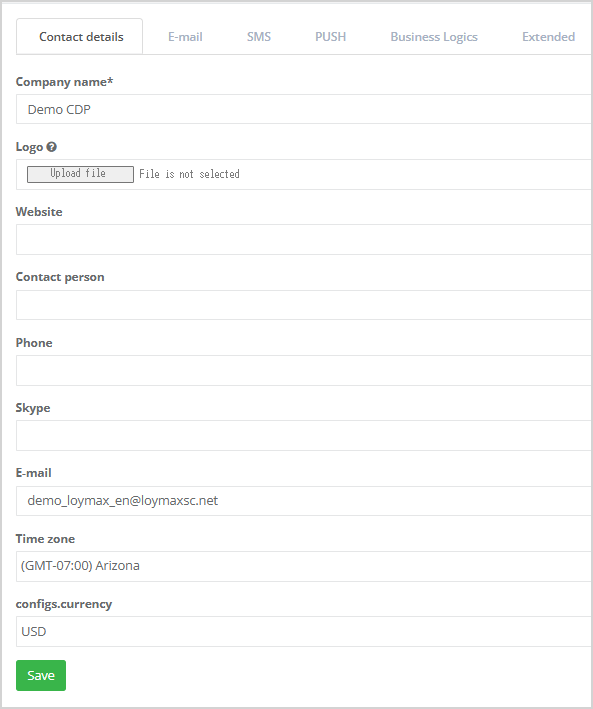
The Contact Details subsection contains the following fields that need to be filled in: - Company name;
- Logo — select a file to upload the company logo;
- Website — enter company website address;
- Contact Person;
- Phone;
- Skype;
- Email;
- Time Zone — select the appropriate time zone from the dropdown list;
- configs.currency.
|
|
Email
Settings in the Email subsection are used in the Email mass messaging section.
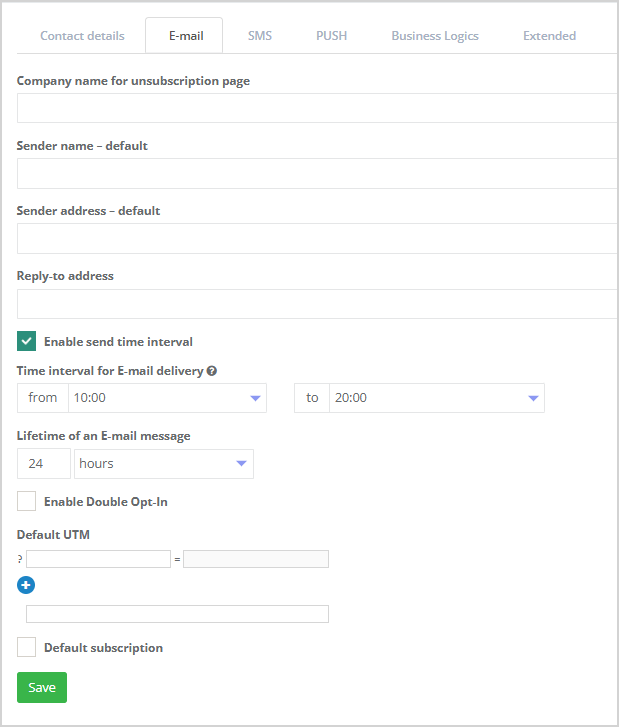
These data are automatically inserted into the corresponding fields when an email campaign is created: - Company name for unsubscription page is displayed on the subscription management page;
- Default sender name;
- Default sender address;
- Reply-to address — fill in this field if replies or customer feedback are expected;
- Enable send time interval;
- Time interval for email delivery — set a time range for message delivery according to the time zone specified in the Contact Details section;
- Lifetime of an email message — specify the message lifetime in hours, days, or minutes;
- Enable Double opt-in;
- Default UTM tags — if needed, you can add UTM tags to track online advertising campaigns. If an UTM tag is defined, it will be added to all links in the email;
- Default subscription — check this box if you want to enable subscription by default.
After filling in all fields, click Save. All data entered in this section will be used by default in email campaigns. |
|
SMS
Settings in the SMS subsection are used for SMS mass messaging.
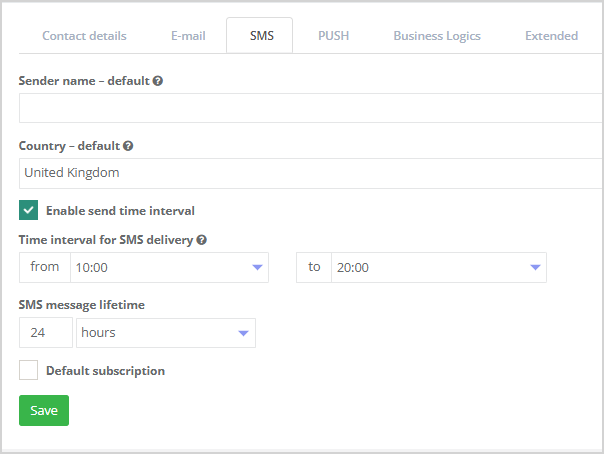
Fill in the fields below — the data will be automatically inserted into the appropriate fields when creating an SMS campaign: - Default sender name;
- Default country is used to complete phone numbers provided in incomplete format. For example, if the client's number is "7816-887-178" and the field contains "UK", the SMS will be sent to "+44-7816-887-178";
- Enable send time interval;
- Time interval for SMS delivery — SMS messages are delivered to recipients only within the time range configured in the System (e.g., from 09:00 to 21:00). If the current time at the recipient’s location falls outside of this allowed interval, the message will remain in the queue until the next day when the permitted delivery time begins;
- SMS message lifetime — specify the message lifetime in hours, days, or minutes;
- Default subscription — check this box if you want to enable subscription by default.
After completing all fields, click Save. All data entered in this section will be used by default in SMS campaigns. |
|
Push
Settings in the Push subsection are used for Push mass messaging.
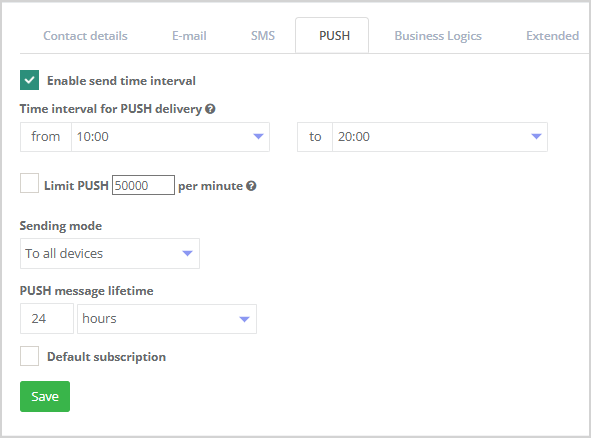
Fill in the fields below and the data will be automatically applied when creating Push campaigns: - Enable send time interval;
- Time interval for Push delivery — push notifications are delivered to recipients only within the time range configured in the System (e.g., from 09:00 to 21:00). If the current time at the recipient’s location falls outside of this allowed interval, the message will remain in the queue until the next day when the permitted delivery time begins.
- Limit Push;
- Sending mode;
- PUSH message lifetime — specify the message lifetime in hours, days, or minutes;
- Default subscription — check this box if you want to enable subscription by default.
After completing all fields, click Save. |
|
Business Logic
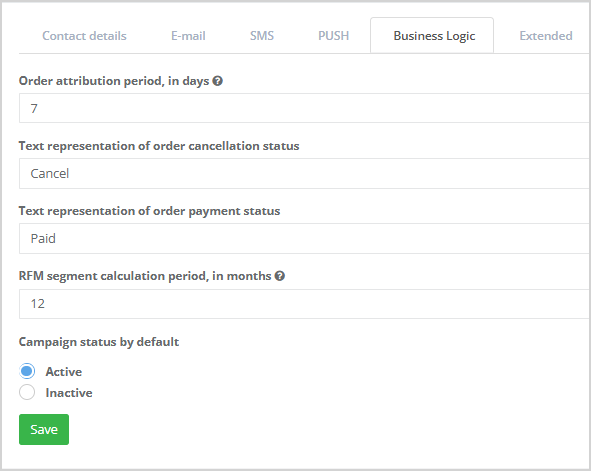
To analyse the effectiveness of marketing campaigns in customer acquisition and retention, use the settings in the Business Logic section.
- Order attribution period, days — the value entered here is automatically applied in the corresponding setting for mailings. For more information on receipt attribution, see here.
- Text representation of order cancellation status — by default set to Canceled. This text can be changed to any other if needed.
- Text representation of order payment status — by default set to Paid. This text can be changed to any other if needed.
- RFM segment calculation period, months — specify the time period for which the data should be considered when building RFM segments;
- Campaign status by default.
Click the Save button to save the data in the System. |
|
Extended settings
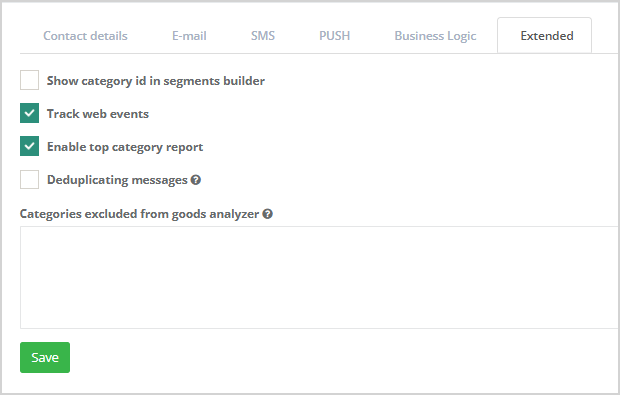
The following features are available in this subsection: - Show category id in segments builder;
- The Track website events function allows the system to record customer visits to the website and associate this activity with the customer’s profile in the Loymax Platform. Based on this data, the system builds a map of the customer's interests related to products and product categories, and enables functionalities such as abandoned cart recovery and other web triggers.
If website event tracking is enabled, customer actions on the website will be displayed in the Customer Profile > Activity section. - Enable report on top product categories — activating this option adds the Product Sales section to the mass mailing report.
- Deduplicating messages;
- Some categories can be excluded from the Product Sales report. To do this, list them in the field Categories excluded from goods analyzers.
|
|
Integration monitor
On this tab, you can configure the recipients of the daily integration monitor summary. Enter each email address on a separate line. | 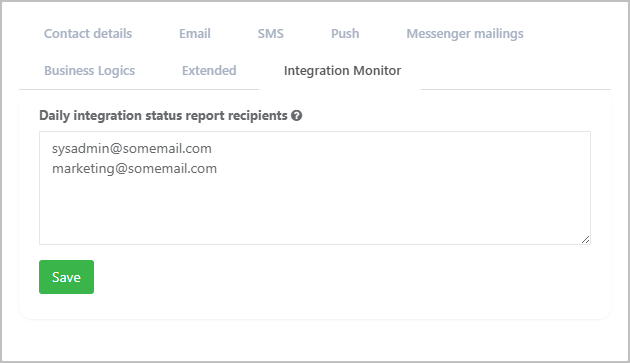 |
