
10 - Card blocking
Card blocking is required in case of loss or damage with subsequent replacement with a new card.
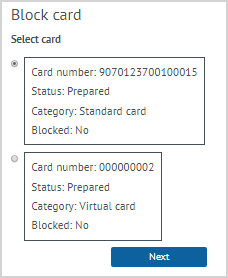
| To block a card it is required to select the Card blocking action in the customer profile. The form displays all activated and unblocked customer cards with the number, status, and category. The mark should be set for the card that must be blocked, then click Next. |
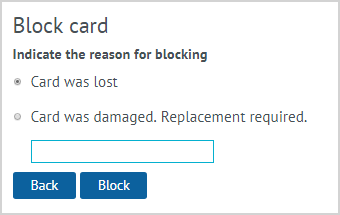
| In the form that appears, it needs to specify the reason for blocking the card:
|

| After clicking the Block button, the card status will be changed. When viewing the LP Member's card for this card, the Yes value will be in the Blocked column. |
Notes:
- If the card has not been activated, then blocking/replacement is not possible.
- If the LP Member has linked a mobile phone number, then the identification occurs automatically.
- If the LP Member did not fill in personal data, then the operator recommends to perform registration.
- The call center operator additionally identifies the LP Member by clarifying personal information (full name, date of birth, last purchase, etc.).
- With a blocked card, it is impossible to conduct any operations in the Loyalty Program. For instance, it is impossible to provide preferences for purchase, as well as to conduct the operation of manual accrual/deduction of bonus points.
- In case of loss, a new card is purchased at a point of sale.