
Classifiers
The Classifiers section is responsible for identifying the product catalogue when multiple versions of such a catalogue exist (e.g., different catalogues for an online store and point of sales).
There are two types of classifiers:
- System classifiers — primary classifiers created automatically when new employees are added to the System. These classifiers cannot be deleted or have their Code parameter modified.
- Additional classifiers — classifiers created by employees for additional versions of the product catalogue. There is no limit on the number of additional classifiers.
Classifier list
Managing the list of registered classifiers and viewing their codes is done in the Classifiers section under Settings in Loymax Smart Communications.

|
Clicking on a classifier name opens the Classifier property modal window, where you can edit the classifier name and code or delete it. Only additional classifiers can be deleted.
Creating a classifier
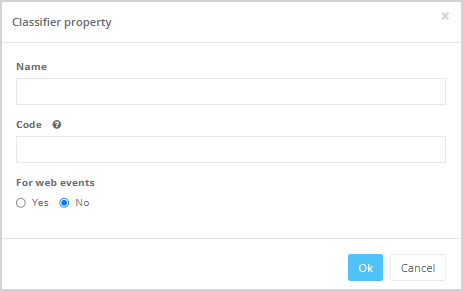
Click the Add classifier button to create a new classifier. The Classifier property modal window will open, where the following fields should be filled in:
- Name of the classifier;
- Code — the classifier code used during product/category catalogue import. This code is also used when processing events in the JS Tracker.
- For tracker — select whether this classifier should be used for web events in the JS Tracker or not.
|
Using Classifiers in the Segment Builder
If the For web events option was selected when creating the classifier, it will be used when processing events related to the product catalogue in the JS Tracker (e.g., when a customer viewed a product or category on the website). If No is selected, this classifier will not be used for event processing. In this case the system classifier will be used both for event processing on the website and in the Segment builder.
Classifiers selected for web events can then be used in the Segment builder when creating marketing campaigns and mass mailings.

|