
IP Warmup
Article Contents:
What is IP warmup
IP warmup is the process of gradually increasing the volume of messaging campaign sent from a new IP address. This is done to build a positive sender reputation with email service providers (such as yahoo.com, gmail.com, etc.).
Internet service providers treat email sent from a new IP address as suspicious until a positive sender reputation is established. Achieving maximum email deliverability typically takes 4 to 8 weeks, depending on factors like list targeting, volume, and subscriber engagement.
The IP warmup process may take longer if recipients do not perceive the emails as a mailing they have explicitly signed up for ("opt-in"). Some internet providers limit new senders by imposing volume caps until a positive reputation is established. For example, AOL sets a daily limit of up to 5,000 messages for new senders, while Outlook allows up to 20,000 messages during the first week.
To make a good impression on internet providers from the start, we recommend sending emails only with highly relevant content for recipients.
Focus your initial warmup on your most active subscribers. As you ramp up the volume, gradually incorporate older customer segments into the mailing list. These older segments should be added in small increments — around 10–25% at a time — to avoid damaging your reputation. Run re-engagement or win-back campaigns to reactivate subscribers who signed up more than six months or a year ago (depending on the mailing frequency). Always use fresh email content to increase the chances to recapture customer interest.
The goal of the warmup process is to send emails only to subscribers who are least likely to mark messages as spam or unsubscribe. This typically includes your newest subscribers and those who consistently open your emails or click on links.
The more consistently you maintain the volume, frequency, complaints and unsubscribe rates during the warmup phase, the faster you will build a positive sender reputation.
If you send emails infrequently (less than once a week), it will take more time to establish a positive sender reputation.
IP warmup plan
Path to success
Recommended threshold values | Comments | |
|---|---|---|
Week 1 | 20,000 messages per day per internet provider, except AOL and Yahoo: AOL: start with 5,000 messages per day and gradually increase. Yahoo: start with 40,000 messages per day. | During the first and second weeks, send messages only to your most active subscribers. Prioritize those who were active within the last 30 days before the new campaign launch. |
Week 2 | 40,000 messages per day per internet provider, except AOL and Yahoo: AOL: 10,000 messages per day. Yahoo: start with 80,000 messages per day. | |
Week 3 | 80,000 messages per day per internet provider, except AOL and Yahoo: AOL: 20,000 messages per day. Yahoo: start with 160,000 messages per day. | During the third and fourth weeks, send messages to subscribers who were active within the last 60 days. |
Week 4 | 160,000 messages per day per internet provider, except AOL and Yahoo: AOL: 40,000 messages per day. Yahoo: start with 320,000 messages per day. | The specified volumes are maximum limits. Note: Never increase your mailing volume more than by twice compared to the previous week's mailing once you exceed the first week’s limit. |
Week 5 (and beyond) | Do not send more than double the volume of messages sent last week/day. Add older customer segments in parts and carefully monitor the statistics. If you encounter issues with an internet provider, revert to the previous mailing volumes. | During the fifth week, keep the percentage of inactive subscribers below 25% of the total messages sent. You may double this volume each subsequent week. |
What to expect
Once you begin warming your IP addresses, you may experience some increase in volume and potential blocking. It is important to stick to the plan. Below is detailed information on what to expect and how to respond.
Mass mailing to Yahoo, AOL, Gmail. Generally, after several mailing cycles with positive metrics, deliverability usually improves, but it may take time to achieve inbox placement for initial messages. The key is to keep sending.
Potential blocking by internet service providers may occur if your subscriber list lacks sufficient engagement or if you exceed the daily sending limits for each provider, as outlined in the table above. The key is careful list segmentation and potentially reducing your current sending volume to the volume permitted for that week. You can then begin to ramp up volumes according to the specific provider's tolerance. It is important to maintain consistent sending activity.
It is essential to closely monitor your metrics and adjust your warmup plan accordingly throughout this period.
Why IP warmup is so important
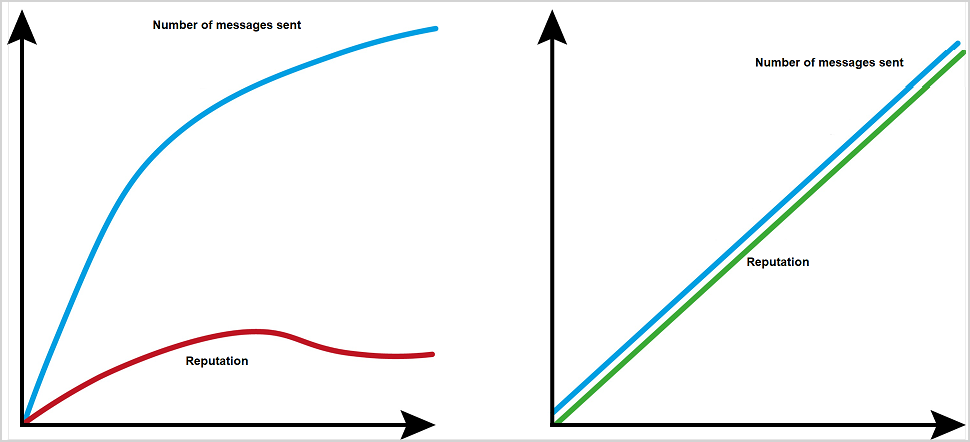 |
Fast warmup | Slow warmup |
|---|---|
Internet service providers observe sudden spikes in volume | Internet service providers observe gradual volume growth |
Unknown senders | Positive reputation develops over time |
Increased risk of blocks/filtering/speed rate limiting | Occasional blocks/filtering/speed rate limiting |
IP warmup helps build a good sender reputation
Sender reputation reflects how recipients perceive you and your emails.
Email reputation directly impacts deliverability:
- Poor reputation => Spam folder or Block;
- Good reputation => Inbox folder.
The reputation of a sender's domain and/or IP address depends on:
- Spam complaints;
- Invalid email addresses (hard bounces);
- Spam trap hits;
- Authentication (SPF, Sender ID, DKIM, DMARC);
- Third-party blacklists;
- Engagement.
Positive factors for your reputation:
| Negative factors for your reputation:
|
Reputation basics
- Subscribers (opt-ins) are the most important.
- If people don’t want your emails, your reputation suffers.
- Recipient behavior and engagement metrics are decisive factors for inbox delivery.
- You cannot transfer your reputation from a previously used IP address.
- If you use the same domain, you may transfer domain reputation. However, providers like Gmail consider both domain and IP reputation, so you should still follow the warmup process.
- Internet service providers trust their users' behavior and observed metrics, so no brand receives preferential treatment.
- B2B senders should follow the same warmup process as B2C senders, as many business domains are now hosted on Yahoo, Outlook, Gmail, AOL, etc.
Permission and engagement are the key factors
Permission is the cornerstone of building a good sender reputation.
Subscribers complain about emails they didn’t expect:
- Are you sending more messages than promised?
- Did they sign up for exactly what they are receiving?
- Does the content you send differ from what you promised?
Why subscriber engagement matters
Internet service providers monitor how engaged your subscribers are with your emails and the nature of that engagement.
Positive actions include:
- Opening the message;
- Adding the email address to the contact list;
- Clicking on links;
- Enabling images;
- Reading speed (e.g., scrolling through the message).
Negative actions include:
- Marking your email as spam;
- Deleting your email;
- Moving it to the junk folder or ignoring it.
Engagement score is another reason to use only opt-in or confirmed opt-in email marketing lists. Permission-based lists maximize engagement likelihood, as the recipient already has an established relationship with the sender, at least in theory.
Remember: quality over quantity
- You pay based on your mailing volume. If a message is never opened, that money is wasted.
- Return on investment (ROI) decreases when passive subscribers are included in campaigns.
- Inactive subscribers often cause spam complaints, spam trap hits, and hard bounces, which can harm deliverability for active subscribers and reduce ROI.
- Run regular re-engagement campaigns to reactivate inactive subscribers.
- Send messages to inactive subscribers less frequently than to active ones.
How to maintain high customer engagement
- Send relevant content to active subscribers.
- Set clear expectations from the start.
- Allow subscribers to choose their preferred email frequency (e.g., daily, weekly digest, or triggered by product availability). If you send infrequently, explain why. Ask subscribers to add you to their address book upon sign-up.
- Implement an onboarding program to set expectations.
- Keep your mailing lists clean — remove invalid email addresses and spam traps.
- Start by cleaning your registration forms. If possible, block spammy, personal, or role-based email addresses.
- As your lists age, filter out inactive subscribers.
Spam traps
Primary spam traps
Email addresses created solely to catch spammers. These email addresses have never belonged to real people, never subscribed to mailing programs, and never made any purchases. If your emails hit these pristine traps, it usually indicates you have a poor data collection partner.
Recycled spam traps
Email addresses that once belonged to real users but were abandoned and later repurposed by internet providers as spam traps. Before converting a dormant address into a spam trap, providers typically return a "user unknown" error for a certain period (6 to 12 months). If your emails hit a recycled spam trap, it usually means your data hygiene process is ineffective.
How to avoid and remove spam traps
- Never buy or rent mailing lists;
- Remove hard bounces;
- Regularly run re-engagement campaigns for inactive subscribers;
- Remove inactive subscribers after multiple failed attempts to re-engage them.