
Customer lifecycle
Customer lifecycle in the Loyalty Program.
Contents:
Customer and LP Member concepts
There are two distinct concepts within the Loymax System: Customer and Loyalty Program Member (LP Member):
Thus, to become an LP Member, one needs to go through the entire registration procedure. The registration steps can be determined individually for each Loyalty Program. All personal data of Members after registration in the Loyalty Program are stored in the System. They can be deleted only after refusal to participate in the Loyalty Program. To cancel participation in the Loyalty Program, the Member can use a special function of the Personal Account or address the Call Center. After the Member is excluded from the Loyalty Program, all personal data are deleted from the System:
If after refusal to participate in the Loyalty Program the customer wants to join it again, one will have to go through the registration procedure once again. The customer may be at different stages of interaction with the Loyalty Program. Depending on this fact, the customer may have different states in the System (For more information about customer states, please refer to a separate article). | 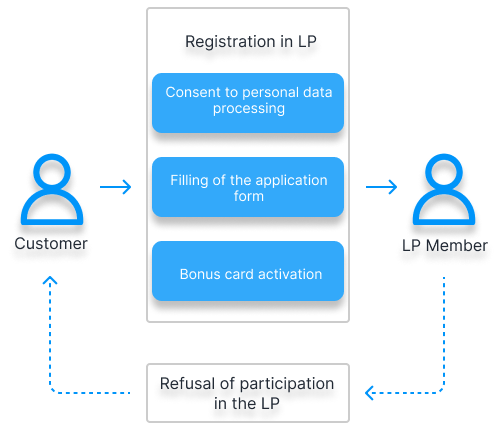 |
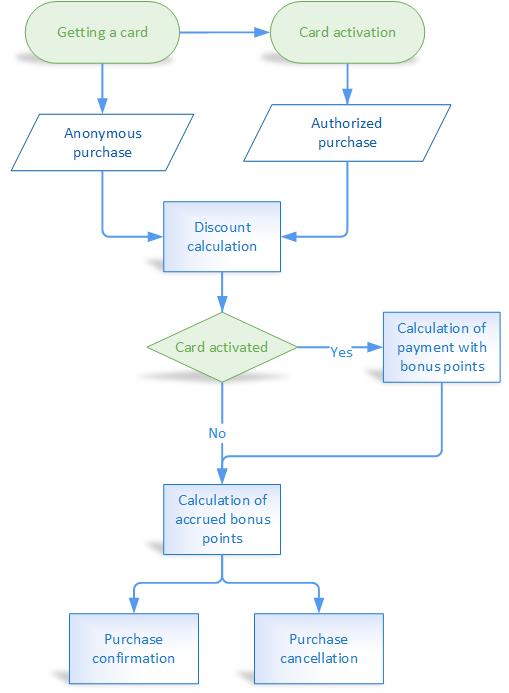 | Stages of joining the Loyalty ProgramThe customer joins the Loyalty Program (LP) in several stages: First stage — getting an LP card at a point of sale.
Second stage — customer registration in the LP and card activation.
|
Read also:
Registration channels and methods
The Loymax System provides several ways to register customers in the Loyalty Program.
Registration on the LP website
The stages of customer registration on the LP website are customized based on the business requirements of each specific Partner. In general, during registration the customers need to provide their contact details (phone number and/or email), fill in the required personal data, accept the terms and conditions of the Loyalty Program and offer agreement, agree to personal data processing, and agree to receive mailings. Also, during registration, the customer is usually asked to link a physical card (if any) to the account. Upon completion of registration on the LP website, it is possible to create a virtual card.
Read also
Registration via Mobile App
To register in the Loyalty Program using a Mobile App, the customer needs to download the Mobile App and install it. At this stage, the app is assigned a unique ID that identifies the device and the customer. An anonymous virtual card of an anonymous user can also be automatically created. The customer can use the app anonymously, however, it is possible to limit the customer’s actions in the app until registration. To register using a Mobile App, the customer should also specify contact details, fill in an application form, accept the LP rules, terms and conditions of the offer agreement, agree to personal data processing and to get mailings.
Registration via Call Center
During registration in the Loyalty Program via Call Center, customers contact the Call Center by phone and provide personal details and bonus card data to the Call Center operator, accept the LP rules and terms and conditions of the offer agreement. The Call Center operator inputs the customer data into the Loymax System and performs registration in the Loyalty Program.
Registration at a point of sale
During registration in the Loyalty Program at a point of sale, customers can fill in a paper form or verbally pass the data to the cashier. When filling in a paper application form, customers should indicate their contact details and the required personal data, accept the terms and conditions of the Loyalty Program and offer agreement, and agree to personal data processing. After that, customer data are input by the operator into the Loymax System. After the aplication form is processed by the operator, a password for customer access to the Personal Account is sent to the phone number specified by the customer.
When a customer passes the data verbally, a cashier enters the data about the customer and the card into the System as verbally provided the customer. The customer also verbally accepts the LP rules, terms and conditions of the offer agreement and agrees to personal data processing. After that, the card is activated and the customer becomes a registered Member of the Loyalty Program.
Registration by SMS
To register by SMS, it is required to send information in a certain format specifying the card number, customer name and date of birth to a short telephone number. Processing searches for a card by its number. If a corresponding non-activated card is found, personal data is filled in, the phone number from which the message was sent is linked, and the card becomes activated. After successful registration of the customer and activation of the card, the customer receives in a reply message the data for authorization in the Personal Account.
Sending and receiving data during the registration process is carried out using the public API methods.
At least one of the customer’s identifiers must be provided during registration: card number, phone number or email address.
Required registration steps usually include:
- phone number linking,
- customer's consent to the terms and conditions of the offer agreement and personal data processing,
- completion of the application form.
The order of steps and their mandatory nature should be determined by business requirements in the Loyalty Program. For example, linking email and card numbers are frequently the optional steps.
Once registration is complete, the LP card is activated.
Depending on the configuration settings, only physical cards or only virtual cards, or both at the same time, can be used in the Loyalty Program. The maximum number of cards per customer is also regulated by the settings. In any case, at least one card (physical or virtual) must be activated at the end of registration.
In the System there is a possibility to link cards after registration. In this case customers can link both their own cards and the card of another registered LP Member. The linked card can be either physical or virtual.
- The LP Member's card linked to the account after registration becomes activated immediately.
- Only activated unblocked cards can be murged under one account.
Completing and editing personal data
During registration, the customer can specify only the required personal data (for example, full name and date of birth). After registering in the Personal account, the LP Member can edit the application form. Mandatory and the ability to edit individual fields can be set using the designer of the application form.
Special offers can be set up in the system to encourage filling in additional fields of the application form.
During registration, the customer can specify only the required personal data (for example, full name and date of birth). After registering in the Personal account, the LP Member can edit the application form. Mandatory and the ability to edit individual fields can be set using the designer of the application form.