
Event communication
Communications triggered by events that happen in the Loymax system are classified as event communication.
The Loymax system can monitor events and respond to them. A complete list of available events is provided in the dedicated article. For these events, marketers can configure communication channels with LP Members.
The following types of event communication are available in the System:
- Communications triggered by in-store purchases
- Communications triggered by non-purchase LP actions
- Automatic notification about bonus activation
- Automatic notification about bonus expiration
- Automatic birthday notification for LP Members
Communications triggered by in-store purchases
Communications with customers or LP Members during an in-store purchase are considered event communication. The system can be configured to deliver messages immediately after specific events occur at the point-of-sale checkout:
- Discount calculation — a customer made a purchase and received a discount on the receipt, product group, or individual product.
- Bonus points calculation — an LP Member performed an action that resulted in bonus points being accrued to their bonus account.
- Deduction — an LP Member redeemed bonus points from their loyalty card within the Loyalty Program.
- Balance request — an LP Member requested their balance at a POS terminal.
- Card assigned — a customer received an LP card.
- Purchase completion — a receipt was finalized.
- Purchase by friend — an LP Member who registered as a referral made a purchase.
The table below lists available communication methods for in-store purchase events:
| Messaging method | Action | Description |
| Message to receipt | Message to receipt | A predefined message appears on the customer’s receipt. |
| Cashier message | Cashier message | A predefined message appears on the cashier’s screen. |
| SMS | Send message | Short text-only messages are sent to LP Members’ phone numbers. |
Messages are sent to LP Members via email and may include formatted text, images, and links. | ||
| Push | Push notifications are delivered to smartphones of LP Members who have installed the LP’s mobile application. Messages may contain text only, image only, or both. | |
| Viber | Instant messages are sent via Viber to LP Members registered on this messenger. Messages may contain text only, image only, text with a URL button, or text, image, and button combined. | |
| Social media | Messages are sent to LP Members who have accounts on social media. Messages may contain text only. Message templates must undergo prior moderation by the social media platform. |
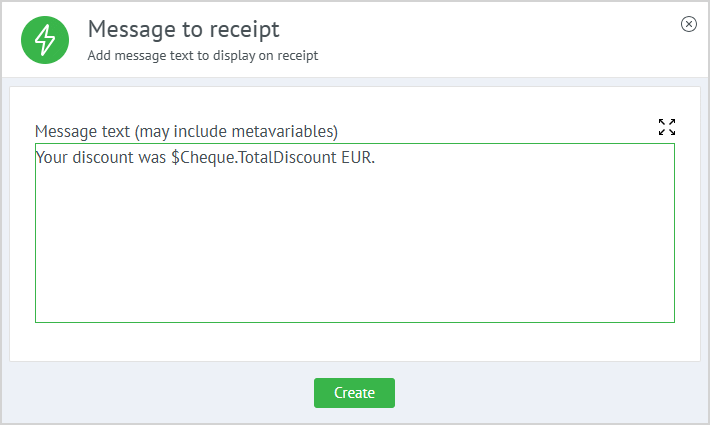
When configuring the Message to receipt, Cashier message, and Send message actions, you can use filters and counters. An example of a receipt message using metavariables is shown on the right. For more details on message templates and metavariables, refer to the corresponding section. After substituting the appropriate metavariable values, the message will appear as follows: Your discount amount was 8 EUR. |
|
Communications triggered by non-purchase LP actions
This type of communication is linked to specific actions performed by a customer or LP Member within the Loyalty Program, associated with the following events:
- Card activation — a customer registered, and their issued card changed to the Activated state.
- Registration completion — a customer completed registration in the System.
- Application form completion — an LP Member filled out an additional section of their application form.
- Phone/email linking — an LP Member linked and verified a phone number or email address to their LP account.
- Mobile App installation — a customer or LP Member installed the LP’s Mobile application.
- Social media linking — an LP Member linked their social media profile.
- Social media activity — an LP Member performed an action on social media (comment, repost, like).
- Social media group joined — an LP Member joined a social network group.
- Social media activity removal — an LP Member deleted comments, likes, or reposts from their page.
- Social media group exit — an LP Member left a social network group.
- Inviting friend — a customer or LP Member acted as a referrer, and their referral entered the unique friend code during registration.
- Customer status change — an LP Member’s status changed due to an offer, a recurring task, or another trigger.
- Status calculation — a status was assigned to an LP Member via a recurring task or an offer with the Status assignment action.
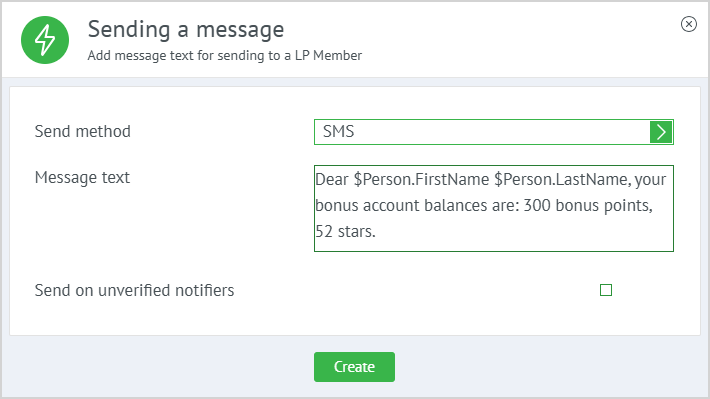
The messaging method for the above actions is configured in the Loymax Platform by creating an offer and selecting the Send message action for a specific event. When setting up this action, you can apply filters and counters.
After inserting the appropriate metavariable values, the message will appear as follows: Dear Homer Simpson, your bonus account balances are: For more information on message templates and metavariables, see the relevant section. |
|
Examples of event communication
Example 1
A customer registers in the System. The registration date serves as the starting point. If the LP Member makes no purchase within two weeks, they receive a message encouraging them to shop at the Partner’s store. If no purchase occurs, a second reminder is sent two weeks later.

|
Example 2
A customer registers in the System. If the LP Member makes a purchase within the first two weeks—say, on day five—the next message is scheduled for two weeks after that purchase date.

|
Automatic notification about bonus activation
To notify LP Members about upcoming bonus activation, configure a recurring task. This notification is set up once in the System. If an LP Member has at least the minimum number of bonus points (specified in the recurring task settings) scheduled to activate (become available for redemption) in the defined number of days, they will receive a notification via the selected communication channel, indicating the bonus amount to be activated. All communication channels used for non-event communication are available for this notification type.
Example notification using a metavariable:
Your $Amount bonus points will activate in 1 day.
Automatic notification about bonus expiration
To notify LP Members about expiring bonus points, configure a recurring task. This notification is also configured once. If an LP Member has at least the minimum number of bonus points (as defined in the recurring task) scheduled to expire in the specified number of days, they will receive a notification via the selected channel, stating the amount. All communication channels used for non-event communication are available for this purpose.
Example notification using a metavariable:
Your $Amount bonus points will expire in 3 days.
Automatic birthday notification for LP Members
This notification type is used to congratulate LP Members on their birthday. Optionally, bonus points of any currency and lifetime can be accrued automatically.
All communication channels used for non-event communication are supported. Instructions for configuring this notification can be found in the relevant section.