
Basic concepts and features of Smart Communications
Customer profile
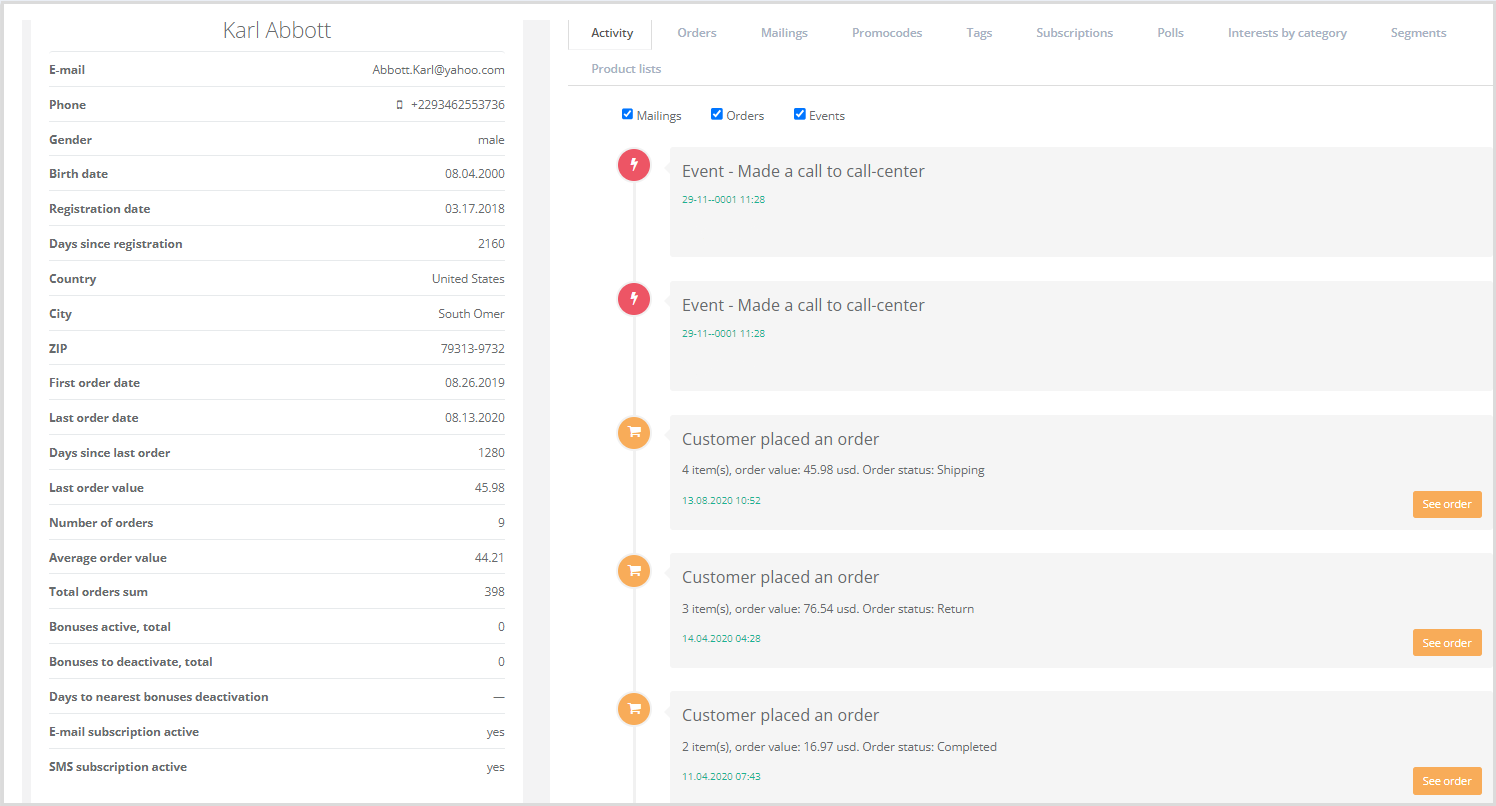
A comprehensive set of information about a customer, including:
- Customer attributes (e.g., name, phone number, gender, city, external metrics).
- Transactional data (purchase or order history).
- Customer-related events (contact center inquiries, website visits, etc.).
- System-calculated metrics (number of orders, average order value, last order date, RFM segment, etc.).
|
Capabilities for working with the customer database:
- Creation of a 360-degree customer profile containing:
- all known customer information;
- customer metric values;
- customer transactions;
- customer events;
- history of communications, metric assignments, and point accruals;
- website visit history;
- system-initiated actions toward the customer and the customer’s responses.
- Rule-based automatic point accrual (e.g., for specific actions).
- Attribution of assisted customer transactions (online/offline) to specific communication sequences and mass campaigns.
- Automatic data quality improvement: standardization of phone numbers and email addresses, automatic detection of time zones, mobile operators, and email providers.
- Calculation and visualization of customer interests based on website browsing history.
Segment
A set of rules defining a group of customers unified by one or more shared characteristics. Segmentation and audience selection capabilities include:
- Visual audience builder.
- Selection based on customer properties, transaction properties, and transaction contents.
- Selection based on bonus points, calculated metrics (AOV, CLTV, RFM, etc.), and bonuses.
- Selection based on customer interests and website visit history.
- Selection by customer events.
- Selection based on survey responses.
- Selection by communication history and customer responses to messages.
- Saved segments.
- Support for customer/transaction source tracking.
- Support for custom fields in customer profiles, transactions, and transaction lines.
Segment examples: one-time buyers, regular buyers, residents of Novosibirsk, toothpaste buyers over age 30.
For each segment, the system stores the selection rules and current segment metrics: number of profiles, average check, LTV, etc.
Segments are recalculated multiple times per day.
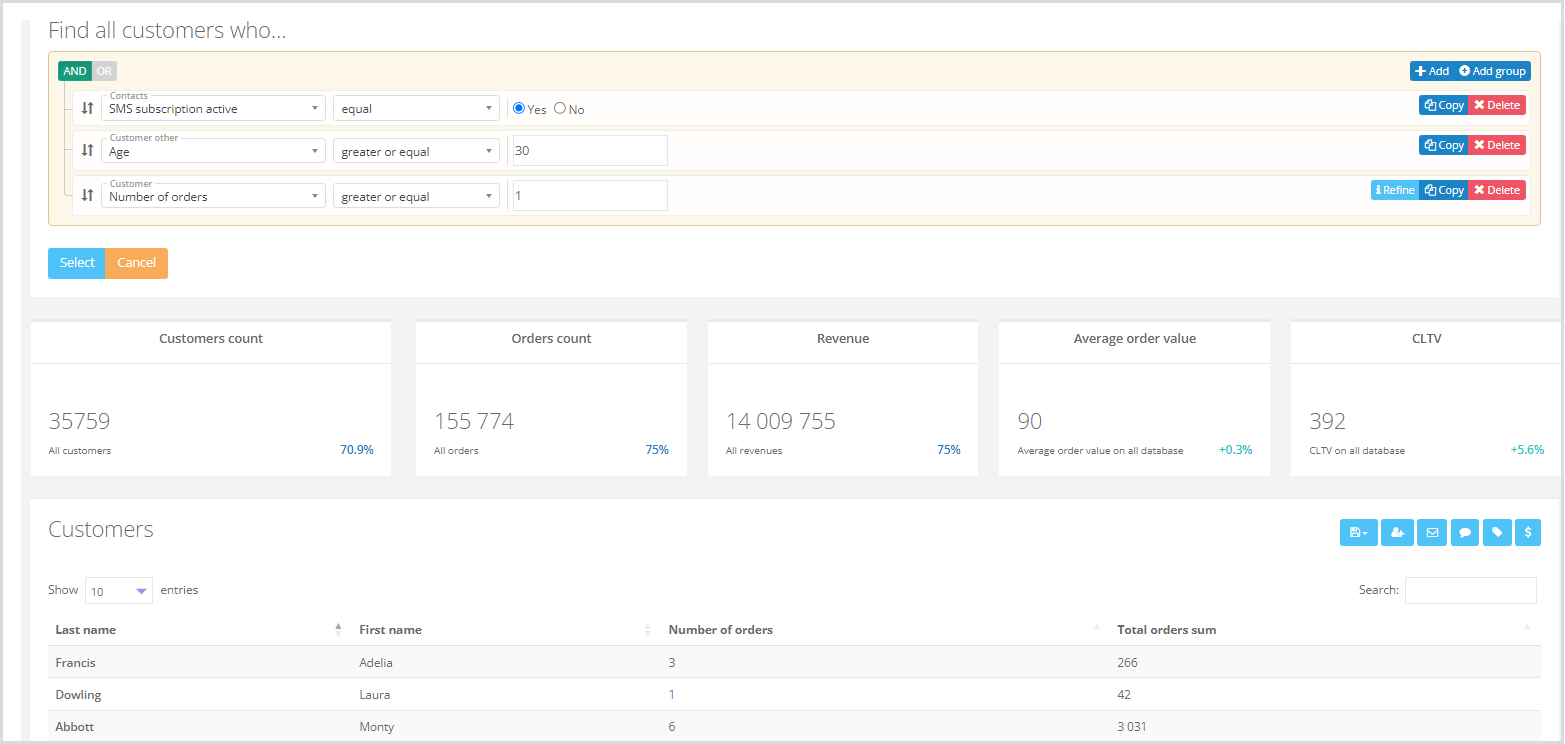
Example selection rules:
- Contact. SMS subscription active: yes.
- Customer. Number of receipts: greater than or equal to 1.
- Customer. Age: greater than or equal to 30.
These rules generate a list of customers over 30 who have made at least one purchase and are subscribed to SMS notifications.
|
Target audiences
Creating a target audience allows you to define a named list of customers.
For example, you can select all customers who purchased a laptop in 2019 and assign them the tag “Laptop 2019”.
For instructions on creating a target audience, see the article.
Mass messaging
A one-time system task to select customer profiles from a specified segment and send them a predefined message. The following channels are available for mass messaging: email, SMS/Viber*, and push notifications.
*Viber access is restricted in the Russian Federation. Usage in other countries is governed by local regulations.
Campaign
Campaigns are automated communication sequences that define rules for system interaction with customers. Campaigns are executed automatically by the system at a specified frequency.
Capabilities for managing communication sequences and mass campaigns:
- Automated communication sequences and manual mass campaigns.
- Visual campaign builder.
- Unlimited sequence length, conditions, and branching.
- Over 20 types of configurable triggers, including custom customer and system-wide external events, abandoned carts, and other on-site activities.
- Control over customer re-entry criteria into communication sequences.
- Visual message editor.
- Message preview across device sizes: desktop, tablet, mobile.
- Email templates.
- Template import.
- Rapid message assembly from prebuilt blocks.
- Advanced template engine with support for conditions and loops.
- Variables: insertion of any customer profile attribute or related object data (receipts, events) into messages.
- Recipient unsubscribe mechanism.
- Personalization based on website behavior (viewed categories, viewed products, abandoned carts).
- Calendar-based visualization of communication sequences and campaigns.
- Email delivery and analytics.
- Email sending via external ESPs or Loymax Smart Communications’ own high-throughput infrastructure (up to 18 million emails per day).
- SMS delivery and analytics.
- Push notification delivery and analytics.
- Delivery error analysis, including server responses and spam filter feedback—automatic flagging of invalid email addresses and phone numbers.
- A/B testing for campaigns and mass messagings.
- Test message sending.
- Time zone–aware SMS delivery scheduling.
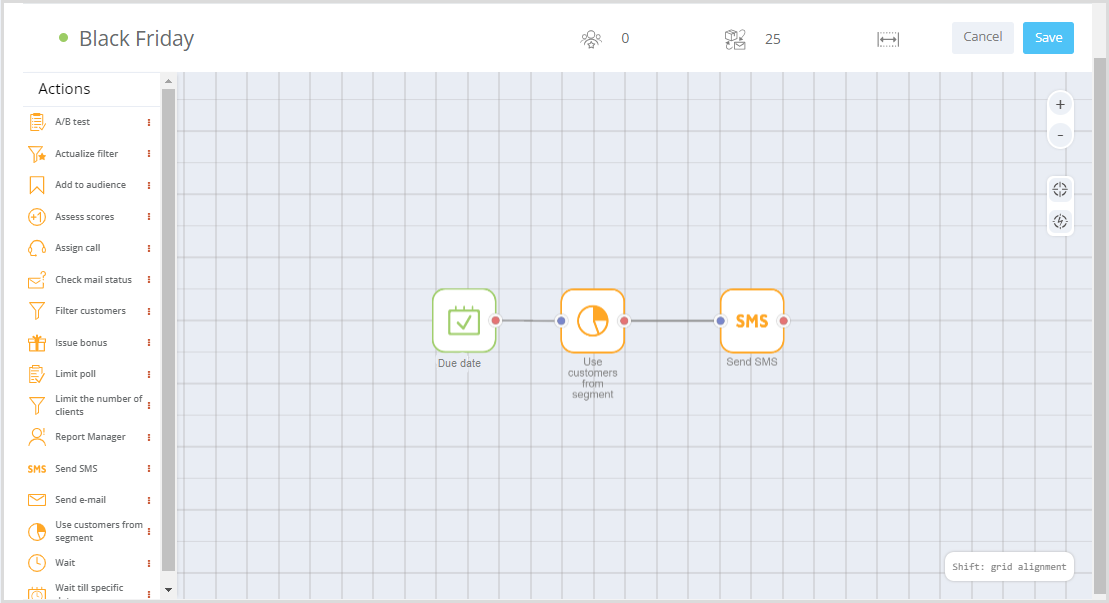
Campaign example:
- Trigger date: November 24, 2023;
- Select customers from segment: regular buyers;
- Send push notification.
In this campaign, all customers in the Regular buyers segment will receive a push notification 24 hours before Black Friday.
|
Analytics
Loymax Smart Communications provides comprehensive monitoring and analytics capabilities. The collected data supports reporting and strategic decision-making for customer engagement.
Analytics capabilities:
- Standard reports on the customer database.
- Summary reports on communication channels, communication types, and more.
- Reports on specific campaigns or mass messagings.
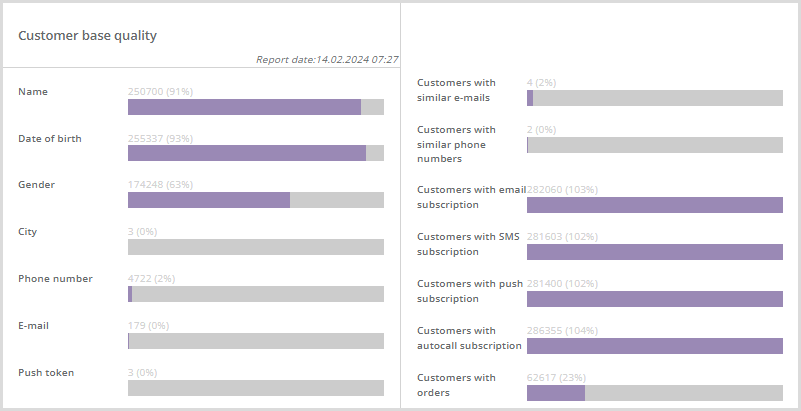
- Trends and current snapshots of customer database quality metrics.
- Delivery performance trends and snapshots for campaigns and sequences.
- Conversion funnel trends and snapshots for campaigns and sequences.
- Campaign effectiveness—tracking of assisted transactions attributed to specific communications.
- Attribution of customer purchases to the triggering campaigns and mass messages.
- Email open-rate reports by time of day and day of week.
- Email delivery reports.
- RFM segment visualization.
- Contact data quality reports.
Example Customer database quality report:
 |
Integration
The platform offers extensive integration capabilities:
- Data exchange with other information systems (import/export);
- Integration with external systems via REST API;
- JavaScript tracker for on-site customer behavior analysis;
- Integration with communication channels (email, SMS, push, in-app, chatbots, voice bots, etc.).
For more details, see the Integration section.