
Private clubs
Private club is a group of LP Members united by the possibility of getting preferences different from the rules of the general Loyalty Program
For example, if the amount of purchases per year exceeds a certain amount, a LP Member has the opportunity to gain special premium status by joining a private club and then participating in the Loyalty Program on special terms. They will receive exclusive offers which are not available to other LP Members. In this way Members gain a unique status and relevance and their brand loyalty is enhanced through their membership in a special closed community.
The functionality of private clubs enables:
For Companies
- Create and edit private clubs in the Admin section of Loymax Platform UI
- Create and run offers for each private club with bonus points accrual that can only be deducted within this private club
- Create promotional content for displaying in the Personal Account and Mobile App to members of a private club
- Send invitations to LP Members and unregistered customers to join a private club
- Accept/reject requests from Members of the Loyalty Program to join a private club
- Remove members from a private club
For Private Club members
- Get exclusive benefits of a private club that are not included in the Loyalty Program
- Get information about special offers of a private club in the Personal Account and Mobile App
- Send requests to join a private club
- Accept/reject invitations to join a private club
Creation and management of private clubs
Private clubs are created and managed in the Private clubs of the Admin section in Loymax Platform.
This section allows:
- Creating and editing private club information. The number of private clubs per Company is not limited.
- Managing the lists of members of each private club (send invitations, accept/reject requests, remove members of the private club).
Read more about using the Private clubs section in Loymax Platform in the Instructions.
Joining a private club
LP Members have several options to join a private club:
On their own initiative by submitting an application from the Personal Account on the website or in the Mobile Application. Only a registered customer — a Loyalty Program Member — may join a private club on their own initiative. An application submitted by a Loyalty Program member will be displayed in the Platform in the Private Club section under the Applications. The private club Administrator may approve or reject the incoming application. If the Loyalty Program member's application is approved, they become a member of the private club. If the Loyalty Program member's application is rejected, the private club Administrator specifies the reason for rejection, which is delivered to the Loyalty Program member's mobile device as a push notification.
By invitation received via SMS or as a push notification. The private club Administrator sends an invitation to join a private club via the Private Clubs section in the Platform UI to prospective or existing Loyalty Program members. The invitation text is sent via SMS if the customer does not have the Mobile App installed, or as a push notification if the Mobile App is installed. An invitation sent via SMS contains links to the Personal Account on the website or the Mobile App. A Loyalty Program member may accept or decline an invitation to join a private club in the Personal Account on the website or in the Mobile Application.
Automatically. Automatic inclusion in a private club can be configured, for example, for payroll projects. When employee card data is transferred to the System, a special attribute containing the private club identifier may also be transmitted. When such cards are uploaded to the System, they will automatically be assigned a flag indicating membership in the specified private club. Thus, immediately after the card is registered in the System, a new Loyalty Program member immediately becomes a member of the private club
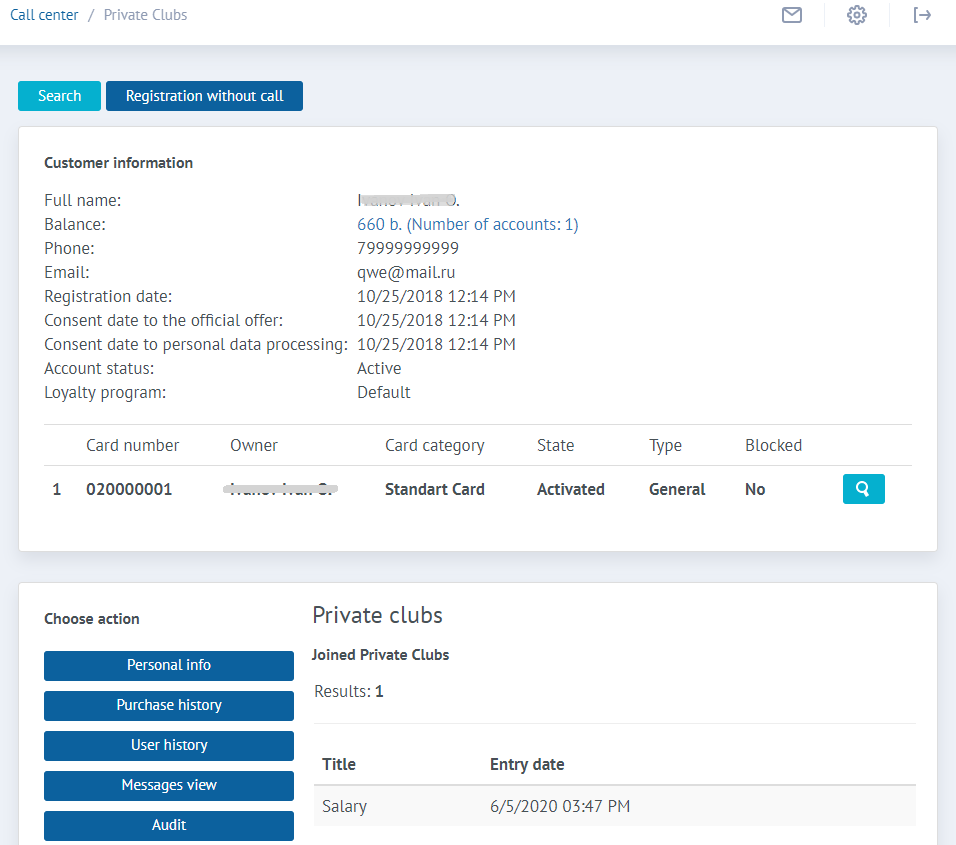
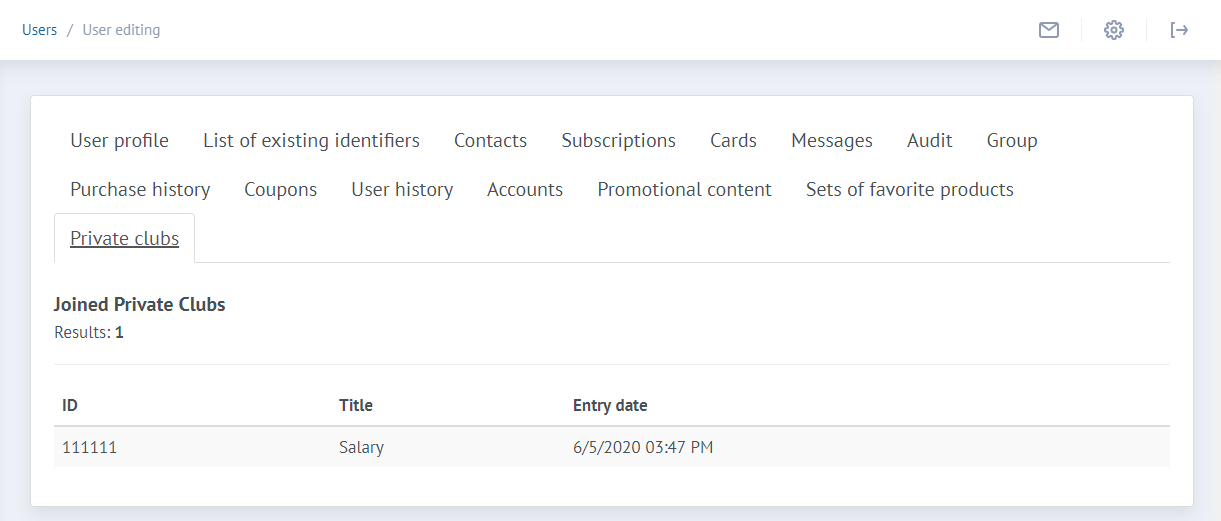
An LP member can be a member of an unlimited number of private clubs. The private clubs that the LP Member is a member of can be viewed on the user’s card in the Users section and in the Call Center.
|
|
Exit from private club
On own initiative
A member of a private club can leave a private club using the Personal Account on the site or the Mobile Application.
When an LP Member leaves a private club, bonus points of a private club are blocked on his/her account. After leaving the private club, the LP Member is not able to save and spend bonus points of the private club. Also, information about the balance of bonus points of a private club is not displayed in the Personal Account on the site and in the Mobile Application.
Expulsion from private club
Expulsion of an LP Member from a private club is initiated by the administrator of the private club through the Private clubs section in Loymax Platform. The administrator of the private club must indicate the reason for removing the LP Member from the private club. Information on the reason for removing from the private club is sent to the LP Member via the push notification channel.
Closure of a private club
The administrator of the private club has the opportunity to close the private club. To do this, in the Private clubs section of Loymax Platform, click the Send to archive button at the private club that you want to close.
When archiving a private club, members of a private club automatically exit this club. Private club bonus points are blocked on the accounts of LP Members, as a result of which they are not able to save and deduct bonus points of the archived private club. Also, in the Personal Account on the website and in the Mobile Application, the bonus points of the archived private club are not displayed.
Bonus points of private club
Bonus points of private club are bonus points accrued at cash registers of private clubs according to the rules of a private club. Private club bonus points are awarded only to members of a private club.
Limitations on the use of private club bonus points:
- Private club bonus points are awarded only at the cash registers of the Company who owns the private club.
- Private club bonus points can only be spent at the cash register of the Company who owns the private club
- The LP Member cannot get and spend bonus points of a private club after leaving a private club.
When merging several parental cards, the bonus accounts of these cards are merged into a single account. All cards from the group (parent and additional) can save and deduct bonus points of a private club from a single bonus account.
Bonus points accrual
Private club bonus points can only be awarded to members of a private club.
Private club bonus points can be available to a private club member immediately after accrual, or after a specified activation period (bonus points activation time). Private club bonus points can also be awarded indicating the duration of validity (bonus points lifetime).
Bonus points of private club can be awarded to private club member in several ways:
Per purchase
When making a purchase by a member of a private club, bonus points of a private club are accrued to his/her bonus account, the amount of which depends on the marketing conditions of the private club. Private club bonus points are credited to the bonus account immediately after the purchase is completed.
When an event occurs
Private club bonus points can be automatically credited to the account of a private club member in the case of a trigger event (for example, installing a mobile application, a certain day, etc.)
Manual accrual
Private club bonus points can be manually awarded by the Private Club administrator using the Accruals and Deductions section in Loymax Platform. Bonus points of a private club can be accrued both to an individual member of a private club and in bulk. The amount of accrued bonus points is set individually for each member of the private club.
Bonus points deduction
Private club bonus points can be deducted from a member’s account in several ways:
At the time of purchasing
Private club bonus points can be deducted from the account of a member of a private club when paying for a purchase at the cash register with bonus points of a private club.
Automatic deduction
If bonus points of a private club were accrued indicating the duration of validity, then bonus points will be deducted from the account of a member of a private club automatically at the end of the validation period.
Manual deduction
The administrator of the private club has the opportunity to deduct bonus points of the private club in manual mode through the Accruals and Deductions section in Loymax Platform. Deductions are possible both from the account of an individual member of a private club, and in bulk. The amount of bonus points of a private club for deduction is indicated individually for each member of a private club.